免费注册
获得15 GB的可用空间并能够下载文件
解锁链接共享
使用您的社交网络登录或注册
验证您的电子邮箱
以使用 4shared 的全部功能。确认邮件已发送至 $[p1]
不确定当前的电子邮箱地址?
更新电子邮箱
证明您不是机器人
In this article:
How to add a category to your app file?
- Right-click your app file (e.g. Myapp.apk) and select Properties from the list of options.
- Open the Category drop-down menu.
- Select the best-fitting category for the app.
- Click Save & Close.
How many categories can I add to an app file I own?
You can add only one category for an app you own, so select wisely.
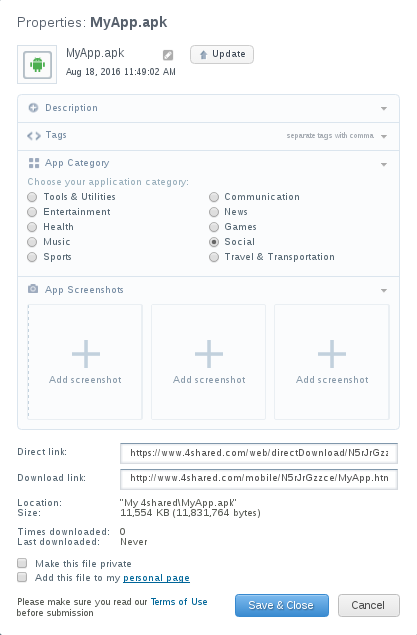
How to add a screenshot to an app file you own?
- Right-click your app file and select Properties from the list of options.
- Click + and select a screenshot picture on your computer.
- Click Upload.
- Click Save & Close.
How many app screenshots to an app file you own?
You can upload one to three screenshots for your app.
Where are the app file screenshots stored?
Your app screenshots are stored in a separate folder App Screenshots in your 4shared account.
How to change/remove app screenshots?
- Right-click your app file and select Properties from the list of options.
- Click X on the screenshot thumbnail you wish to change.
- Click Remove in the pop-up message.
Have more questions?
Request more help